At a glance
- Bottom line
- Treat anything that installed litellm 1.107.0 from PyPI (11:39 to 13:23 UTC, October 21, 2026) or pulled LiteLLM's v1.107.0, latest, main-latest or main-stable images (11:46 to 14:20 UTC) as compromised. Rebuild it, then rotate what it could reach, cloud roles and LLM keys first.
- Affected
- litellm 1.107.0 on PyPI (all seven wheels) and the matching images on Docker Hub and GHCR. LiteLLM says every earlier version is clean, recommends pinning 1.106.2, and says its private enterprise registry was not affected.
- Downloads
- The 3.4 million a day figure is a real daily count, but for all versions: 3,431,091 downloads on October 21, per pypistats.org. The poisoned version itself was downloaded 49,043 times that day, per pepy.tech.
- Abuse
- Wiz says stolen AWS credentials were being tested by 16:20 UTC, in a pattern consistent with LLMjacking. No one has publicly attributed the attack.
What happened
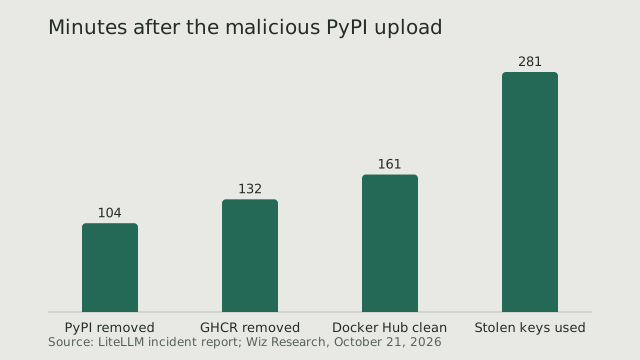
On October 21, 2026, an attacker used LiteLLM's own release pipeline to publish litellm 1.107.0 with a credential stealer inside. Seven wheels reached PyPI at 11:39 UTC. Seven minutes later the same code shipped in LiteLLM's Docker images on Docker Hub and GitHub Container Registry (GHCR), under v1.107.0, latest, main-latest and main-stable. LiteLLM, the open-source LLM gateway and SDK maintained by BerriAI, confirmed the compromise the same day. By its timeline, PyPI had removed the release by 13:23 UTC and the Docker tags were clean by 14:20.
The payload is not in the v1.107.0 Git tag. LiteLLM says the artifacts were built from a lookalike repository, Berri-AI/litellm. Upwind, whose researchers reported the release, matched the wheel's code to a legitimate main-branch commit plus ten attacker commits stacked on top. GitHub's malware advisory GHSA-92x9-889m-jgmw lists 1.107.0 next to 1.82.7 and 1.82.8, which were poisoned in March through a token exposed by a compromised Trivy dependency (GHSA-5mg7-485q-xm76). Two compromises in seven months.
If you run the proxy from a floating tag, the Docker window is yours. Any pull in it got the stealer, including pulls nobody started by hand: a new node, a pod with imagePullPolicy: Always, an auto-updater. LiteLLM says regular releases are paused while its registries stay locked.
October 21, hour by hour
- 08:56 UTC: the first of ten attacker commits lands on the lookalike Berri-AI/litellm (Upwind, Wiz).
- 10:08 UTC: a stolen privileged token overrides branch protection on LiteLLM's private release workflow (LiteLLM).
- 11:39 UTC: seven malicious wheels uploaded to PyPI (LiteLLM).
- 11:46 UTC: poisoned images published to Docker Hub and GHCR (LiteLLM).
- 12:06 UTC: Upwind reports it publicly in LiteLLM's issue tracker.
- 13:23 to 14:20 UTC: PyPI, then GHCR, then Docker Hub are cleaned (LiteLLM).
- 16:20 to 17:01 UTC: stolen AWS credentials tested from two IP addresses (Wiz).
How the release was hijacked
This is the uncomfortable part. After March, LiteLLM did the hardening people ask for: releases from a private repository, trusted publishing, immutable Docker tags, signed images. On October 19 it temporarily widened release permissions so two engineers could ship daily backports. The attacker held GitHub CLI tokens for three developers. One belonged to an organization owner and was used to switch off branch protection and force-push a change that let the releaser build from another repository. The workflow then built, signed and published from the lookalike. A second account approved the production gate; a third deleted the run records.
How the attacker got the tokens is LiteLLM's working theory, not a finding. LiteLLM believes the attacker entered its internal LiteLLM deployment, which was reachable from the internet, and read the tokens from its logs; it suspects a recently patched vulnerability as the way in. Its explanation for how the tokens got into those logs: it has observed specific situations in which Claude Code embeds a user's GitHub CLI OAuth token in a response body, and the deployment logged response bodies. LiteLLM has not described those situations, and no one else has confirmed them. Datadog notes that the March compromise was linked to TeamPCP and that no connection between the two incidents has been established.
What the stealer takes
Each wheel drops cook.pth, cook.py and sitecustomize.py at the root of site-packages. Python runs them at every interpreter start, so the stealer fires whenever any Python process starts in that environment, pip included. Nothing has to import litellm. The wheels cover Python 3.10 and later on Linux, macOS and Windows.
According to Upwind's static decoding, it runs once per host and sends an encrypted archive to www.litellm.dev, a lookalike domain LiteLLM does not own. Your network logs can show that data left, not what it was. It collects:
- Cloud credentials: AWS, Azure and gcloud files, instance-role and ECS task credentials from the metadata service, and GCP and Azure identity tokens.
- On a proxy with DATABASE_URL set, the LiteLLM_CredentialsTable and LiteLLM_ProxyModelTable tables: every upstream provider key the proxy stores.
- The environment of every process it can read, which is where most LLM API keys live.
- Kubernetes, Docker, Vault, CI and package-registry tokens, .env files, SSH, GPG and TLS private keys, browser passwords and cookies, and AI coding tool tokens.
sitecustomize.py also starts a background process that checks a GitHub-hosted file every hour for the address of a server to fetch code from and run it. Upwind and Wiz say it never received a live instruction, and Wiz says GitHub removed that repository at 13:30 UTC. Kill the process anyway.
Wiz says the stolen credentials were used within hours. From 16:20 UTC, AWS instance-role credentials taken from CI runners and Kubernetes nodes were checked with sts:GetCallerIdentity, then bedrock:ListFoundationModels and ListModels. Wiz says the pattern is consistent with LLMjacking: stolen cloud access used to run models on the victim's bill. In a few environments the attacker also enumerated IAM.
3.4 million downloads a day, but not of this version
The 3.4 million a day figure that travels with this story holds, and it is daily, not weekly or monthly. pypistats.org counts 3,431,091 litellm downloads on October 21 and an average of 3.23 million a day over the 30 days to October 21; the weekly total is 22.8 million and the monthly 92.2 million. heise cited the same 3.4 million from Snyk in March.
It is the wrong number for sizing this incident. It covers every version, and CI jobs count again on every run. pepy.tech, which splits PyPI downloads by version, records 49,043 downloads of 1.107.0 on October 21, about 1.4% of the day. Downloads are not machines, and we found no published Docker pull counts.
Your requirements did not need to name litellm. deps.dev counts 3,152 PyPI packages that depend on litellm 1.106.1, the previous day's release. DSPy 3.4.1 (litellm>=1.65.8), langchain-litellm 0.11.1 (>=1.101.0,<2) and guardrails-ai 0.11.0 (>=1.82.5,<2) all accepted 1.107.0, so a fresh, unlocked install of any of them in the window could resolve to it. We found no downstream project that shipped 1.107.0 inside its own release. What matters is whether your resolver picked it.
Check whether you pulled it
Look in lockfiles and CI logs, installed environments, caches and mirrors, and container images. Do not run pip show on a suspect host: LiteLLM warns that starting Python, pip included, runs the payload again. Use the shell.
# 1. Lockfiles, requirements and pinned manifests. Matches 1.107.0 (October)
#    and 1.82.7 / 1.82.8 (March). Pipfile.lock keeps the version on its own line:
#    check its "litellm" entry by hand. In CI logs, search for "litellm-1.107.0".
grep -rnE 'litellm(==|-)1\.(107\.0|82\.[78])\b' . \
  --include='*.lock' --include='*.txt' --include='*.toml' --include='*.cfg'

# 2. Installed environments. Run from the shell; do not start Python on a suspect host.
find / \( -path /proc -o -path /sys \) -prune -o \( -name 'litellm-1.107.0.dist-info' \
  -o -name 'cook.pth' -o -path '*-packages/cook.py' \
  -o -path '*-packages/sitecustomize.py' \) -print 2>/dev/null
ls -la /tmp/.pc_once_72129118c59f5636c0bb /tmp/remote_code_loader.lock 2>/dev/null

# 3. pip and uv caches (on macOS the pip cache is ~/Library/Caches/pip)
grep -rlsa 'litellm-1.107.0.dist-info' ~/.cache/pip ~/.cache/uv 2>/dev/null
A sitecustomize.py hit is a lead, not proof, so read it. The /tmp/.pc_once marker confirms exfiltration; its absence proves nothing, because containers and tmp cleaners remove it. Search Artifactory, Nexus, devpi and pull-through caches too: a mirror can keep serving a release that PyPI deleted.
# 4. Containers: compare what you pulled or ran with the poisoned image digests.
#    Index digests (LiteLLM) and per-platform digests (Wiz), first 12 hex characters.
BAD='1bbcb1443bc9|c00f9d92c427|7b00e91cd2fe|bd1aeee419ea|56b74573eed6|24581ddc3076|827dd893c74c|645a67d81062|f75c8edae59b'
docker images --digests --no-trunc | grep -E "$BAD"
crictl images --digests --no-trunc 2>/dev/null | grep -E "$BAD"
kubectl get pods -A -o jsonpath='{range .items[*]}{.metadata.namespace}/{.metadata.name}{"\t"}{.status.containerStatuses[*].imageID}{"\n"}{end}' \
  | grep -E "$BAD"
Pods and CI jobs that ran in the window and are gone will not show up here. Check registry pull logs, Kubernetes events and CI logs for October 21. On hosted runners the VM is gone, but every secret the job could read may have gone with it. On self-hosted runners, a cached virtualenv keeps the payload and the loader may still be running. Indicators from LiteLLM, Upwind and Wiz:
# Network: block, and search DNS and proxy logs from October 21 onwards
litellm[.]dev, www.litellm[.]dev       exfiltration endpoint; not a LiteLLM domain
raw.githubusercontent.com/letters9813/pythonclient-test    loader dead drop (taken down, per Wiz)
168.100.8[.]57, 165.227.201[.]8        sources of stolen-credential checks (Wiz)

# Host
cook.pth, cook.py, sitecustomize.py    at the root of site-packages
litellm-1.107.0.dist-info              installed package metadata
/tmp/.pc_once_72129118c59f5636c0bb     written only after a successful exfiltration
/tmp/remote_code_loader.lock           held by the background loader process
PRIVCOLLECT_ACTIVE=1                   environment variable set by the stealer

# Image index digest: Docker Hub litellm/litellm and GHCR berriai/litellm, v1.107.0
sha256:1bbcb1443bc962e45f5aad53fe3d2c30600e0379715fb6c664cdd3ac126c339e

# CloudTrail: sts:GetCallerIdentity followed by bedrock:ListFoundationModels,
# from an address outside your infrastructure, using a role from an affected host

# March versions 1.82.7 / 1.82.8: litellm_init.pth, models.litellm[.]cloud
Contain, then rotate, in this order
Contain first. The run-once marker lives in /tmp, so a poisoned container that restarts after you rotate sends the new keys too. LiteLLM's rule: if 1.107.0 was installed on a host with outbound internet, assume the exfiltration succeeded.
- Contain. Rebuild containers and virtualenvs pinned to 1.106.2, whose wheel source Upwind matched byte for byte to its Git tag. Where you cannot rebuild yet, follow LiteLLM's shell steps: delete the three files and matching __pycache__ entries from every site-packages, kill the process holding /tmp/remote_code_loader.lock, then reinstall pinned. Block litellm.dev.
- Cloud identities, the ones Wiz saw abused. For AWS roles, IAM's Revoke active sessions denies every session issued before that moment. Then check CloudTrail for GetCallerIdentity from the role near install time and for any use of its credentials from outside your infrastructure (LiteLLM). Do the same for GCP and Azure identities and any static keys.
- LLM keys: every provider key in the proxy database and in the environment, the LiteLLM master and virtual keys, and the DATABASE_URL password (LiteLLM). Put spend alerts on the replacements.
- Code and release credentials: GitHub tokens including gh logins, PyPI and npm tokens, CI secrets, Kubernetes and Vault tokens. This incident started with three stolen GitHub CLI tokens.
- The rest: SSH, GPG and TLS keys, database passwords and, on developer machines, browser sessions and AI tool tokens. Stolen session cookies get past MFA.
Pin and verify from now on
- Install from a lockfile with hashes: uv.lock, or pip with --require-hashes. A lock written before the release could not have picked 1.107.0.
- Add a cooldown: exclude-newer = "7 days" in uv, --uploaded-prior-to P7D in current pip, cooldown in Dependabot, minimumReleaseAge in Renovate. Both LiteLLM compromises this year were gone within hours, so a week's delay would have skipped both. Keep an exception path for urgent fixes, such as uv's exclude-newer-package.
- Pin images by digest, never latest or main-stable, and turn off auto-updaters on gateway hosts.
- Check provenance, not just signatures. The hijacked workflow signed the poisoned images; their build provenance named the lookalike repository as the source.
# Before promoting a new LiteLLM image, read the source repository from its provenance
docker buildx imagetools inspect ghcr.io/berriai/litellm:v1.106.2 \
  --format '{{ json .Provenance }}' | grep -o 'github.com/[A-Za-z-]*/litellm' | sort -u
# A clean release prints github.com/BerriAI/litellm.
# The poisoned 1.107.0 images named github.com/Berri-AI/litellm.
If you run an LLM gateway
A gateway is a key store with an HTTP port. Keep the LiteLLM admin UI and API off the open internet; LiteLLM believes its own exposed deployment was the way in. Decide what it logs: litellm_settings.turn_off_message_logging keeps message content out of logging callbacks, and general_settings.store_prompts_in_spend_logs controls whether prompts land in the spend-log table. Treat the logs that remain as secrets. And mark October 27: LiteLLM says an embargoed vulnerability fix, already with enterprise customers, is scheduled for disclosure that day. Take it quickly, and check its provenance first.
Sources
- LiteLLM: Contained: Oct 21, 2026 LiteLLM release v1.107.0 Compromised
- BerriAI/litellm issue 47826: litellm 1.107.0 compromised (Upwind report and LiteLLM status updates)
- GitHub Advisory Database: GHSA-92x9-889m-jgmw, Malicious code in litellm (PyPI)
- GitHub Advisory Database: GHSA-5mg7-485q-xm76, Two LiteLLM versions published containing credential harvesting malware
- OSV: MAL-2026-2144, Malicious code in litellm (PyPI)
- Wiz Research: LiteLLM Compromised, Steals Credentials
- Datadog Security Labs: LiteLLM supply chain compromise: What you need to know
- pypistats.org: litellm download statistics
- pepy.tech: litellm downloads by version (1.107.0)
- heise online: Supply chain attack on LiteLLM: Affected parties should change credentials (March 25, 2026)
- deps.dev API: dependents of litellm 1.106.1 on PyPI
- PyPI: dspy 3.4.1
- PyPI: langchain-litellm 0.11.1
- PyPI: guardrails-ai 0.11.0
- LiteLLM docs: All settings (proxy config)
- AWS IAM User Guide: Revoke IAM role temporary security credentials
- uv: Settings reference (exclude-newer, exclude-newer-package)
- pip: pip install (--uploaded-prior-to, --require-hashes)
- GitHub Docs: Dependabot options reference (cooldown)
- Renovate docs: minimumReleaseAge
- Docker Docs: SLSA provenance attestations
- GitHub Advisory DatabaseContains data from the GitHub Advisory Database, licensed CC-BY 4.0.